Not just this laptop
Your desktop, your droplets, your teammate's box. Agent supervision that stops at the edge of one machine stops one machine too early.

v0.1.16 · macOS & Linux · MIT · written in Rust
p2pmux is a peer-to-peer terminal multiplexer. Every pane runs on the machine of whoever opened it — their shell, their toolchain, their env, their AI subscription. Hop into a teammate's pane and you get a real shell on their machine, without ever holding their keys.
$ curl -fsSL https://p2pmux.com/install.sh | sh
One binary. Nothing to sign up for, no account, no server of ours in the data path. The script is served as plain text so you can read it first.
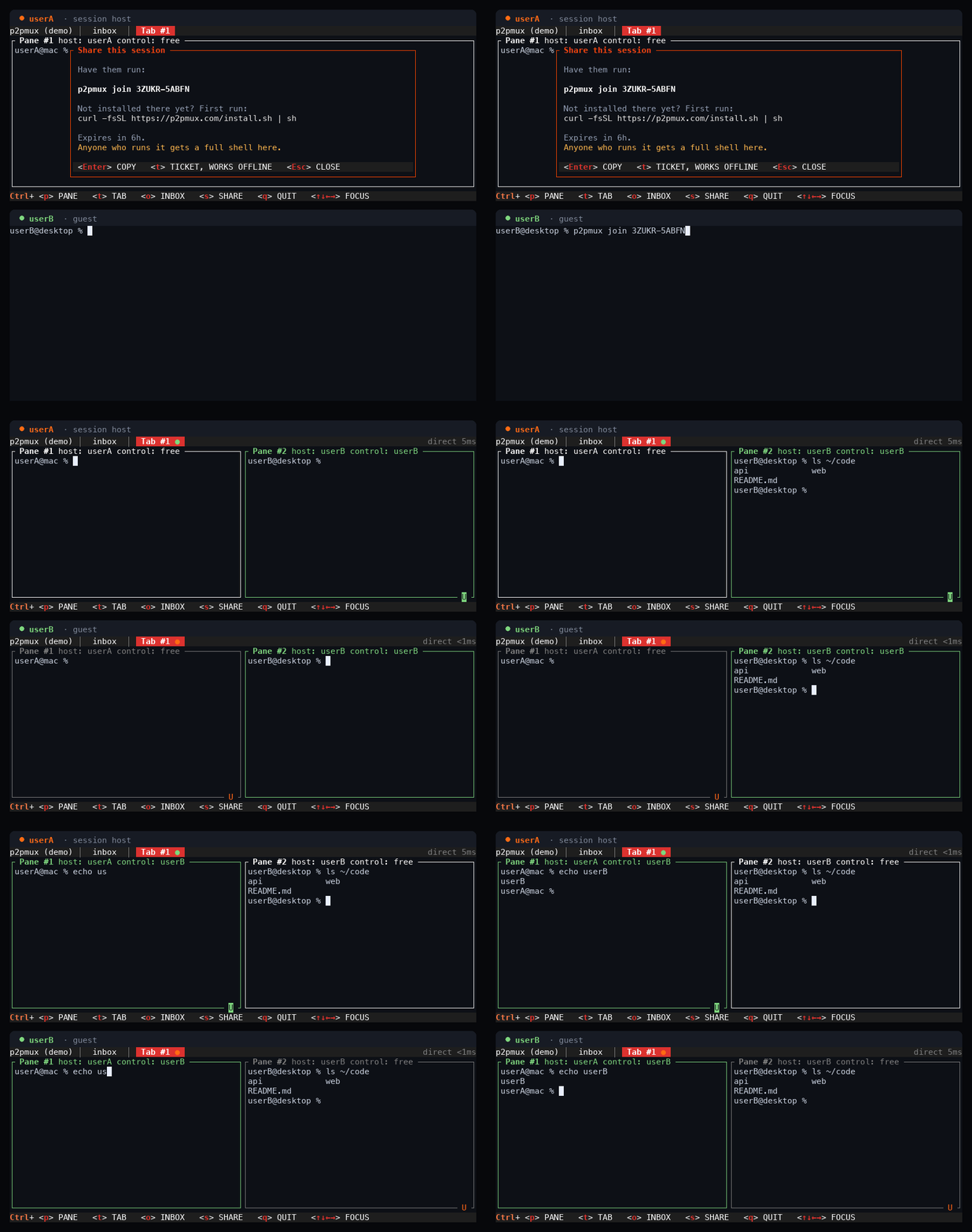
Ctrl+S gives you a line ready to paste into a chat window. Your teammate runs
it on their own machine, on their own network, and lands in your grid. A Mac and a Linux
box work the same session; nobody has to match anybody.
The code is good for six hours, and it is backed by a ticket that contacts no service at all — for when our rendezvous is down.
$ p2pmux                    # you host; Ctrl+S shows the line to send
$ p2pmux join 4KP7Q-M2XRW   # them, on their own machine
SSH, tmux, tmate, screen sharing, cloud dev environments — one machine runs everything, one person's toolchain is the only one in the room, and one person's keys pay for it. Whoever joins arrives empty-handed.
p2pmux keeps the machines separate and joins the surface instead. You bring your laptop, your dotfiles, your language versions and your Claude subscription. Your teammate brings theirs. Both setups are live in the same grid at once, and either of you can reach into the other's.
Concretely: your teammate opens a pane on your machine and runs Claude Code on your subscription — they drive it, you pay for it, they never see the key. The pane beside it is on their box, with their Python env and their GPU, and you drive that one without installing a thing.
Bare p2pmux opens the inbox: every Claude Code, Codex, Cursor, Pi and
OpenCode process running on every machine in the session, sorted by which one is
blocking you. Press Enter on a row and you are typing in that terminal —
on whichever machine it lives on. Ctrl+O brings you back.
                                                                    │
 Agents · 1 needs you                                               │ MACHINES · 4
›● desktop    claude                           needs you      2m14s │
   wants to run: rm -rf node_modules                                │ ● laptop
   work/api · tab 1 · pane 1                                        │   this machine · 1 agent
                                                                    │
 ✓ laptop     claude                           done          31m04s │ ○ oldbox
   6 files changed, tests pass                                      │   asleep
   scratch/demo · tab 3 · pane 1                                    │
                                                                    │ ◇ desktop
 ⠋ droplet    opencode                         running        8m41s │   joined this session · 1…
   running the migration against staging                            │
   srv/checkout · tab 2 · pane 1                                    │ ◇ droplet
                                                                    │   joined this session · 1…
                                                                    │
                                                                    │ ─────────────────────────
                                                                    │ a  add a machine
 enter open   m pick machine   a add machine   n new terminal   q quit
Your desktop, your droplets, your teammate's box. Agent supervision that stops at the edge of one machine stops one machine too early.
needs you comes from the agent's own hooks — never from guessing at output
timing. Run p2pmux setup once; p2pmux doctor checks it.
An agent with no hooks wired up says state unknown — no hooks on its own row, rather than being guessed about.
A bot under systemd, something in a stray tmux — it shows up in the inbox with what
it is doing, and Enter opens its own chat client on its own machine.
A real multiplexer, not a screen share. Tabs, splits, nesting, scrollback, mouse — with the panes scattered across everybody's hardware.
Every pane is a PTY on its owner's machine, with that machine's PATH, env and subscriptions. Host and guest are per pane, not per person.
Take control of any free pane by typing into it, or hand yours over. Active typing is protected, so nobody can yank the keyboard out from under you.
Tabs, panes and nested splits, mirrored to everyone in the room. Up to 8 members, 9 tabs, and 8 panes to a tab.
End-to-end encrypted peer-to-peer, over an iroh relay only when NAT requires it. The
tab bar tells you which you got: direct 55ms or relayed 120ms.
If the coordinator's laptop closes, every pane on every other machine keeps running and keeps taking input. After five minutes the earliest-joined survivor takes the role over.
p2pmux pair associates two machines you own, permanently. After that, bare
p2pmux rejoins on either with no code typed at all.
Presence gives every member a colour, and shows who is on which tab and watching which pane. Full walkthrough — keys, control leases, mouse, scrollback, agent hooks and every config key — is in the usage docs.
A p2pmux session is a fully trusted shared shell. Anyone with the join code can see every pane and can obtain interactive control of the terminals in it — run commands, read output, touch any file that user account can touch.
Processes and credential files stay on the pane host's machine and are never uploaded to peers. That is a real boundary, and it is the point of the design. It is not a sandbox: a controller can still use your credentials, or print one to the screen, through the shell you handed them.
So treat the code like a password, and share it only with people you would hand an unlocked laptop to. For anyone else, use a separate low-privilege account and keep production credentials out of shared panes. Both halves, in detail →
macOS and Linux, Apple Silicon, Intel and arm64. One binary, no daemon to configure.
$ curl -fsSL https://p2pmux.com/install.sh | sh
It fetches a binary and its SHA256 from GitHub Releases and checks the hash before
installing. Served as text/plain, so you can
read it in a browser first — the binaries never come from
this domain, only from GitHub.
$ brew tap pelazas/tap
$ brew trust pelazas/tap
$ brew install p2pmux
Homebrew 6 will not load a formula from a third-party tap until you trust it, so the middle line is not optional there. On Homebrew 5 that command does not exist — skip it.
$ cargo install p2pmux --locked
Linux builds link glibc 2.35 or newer — Ubuntu 22.04, Debian 12, Fedora 36 and up. A musl system has to build from source.
$ p2pmux                       # the inbox, and a session
$ p2pmux setup                 # wire up agent hooks, once
$ p2pmux join 4KP7Q-M2XRW      # one somebody sent you
p2pmux --version says what you are running. Sessions already running keep
the binary they started with, so p2pmux kill <name> and start again
to pick up a new version.
Early, but real. v0.1.16 runs sessions between machines on different networks and different continents. Found a rough edge? Open an issue — a specific report of what broke is the most useful thing anyone can send right now.